Cisco Meraki: Network Management for Businesses of All Sizes

In today’s digital age, businesses depend heavily on reliable and secure networking solutions. As companies grow and their networks become more complex, managing these networks can be challenging. This is where Meraki steps in. Developed by Cisco, it’s a cloud-based solution that simplifies the management of your IT infrastructure, making it ideal for businesses of all sizes. In this article, we’ll explore what Cisco’s Meraki is, its key features, and how it can benefit your business. Additionally, we’ll share a real-world example of how RedBird Technology Solutions implemented this technology in a warehouse, ensuring a seamless and efficient network setup.

Warehouse Wi-Fi Install in Glendale Wisconsin

What is Cisco Meraki?

Meraki is a cloud-managed IT solution offering a range of networking products, including wireless access points, switches, security appliances, and endpoint management tools. The standout feature is its centralized cloud management, which allows businesses to oversee their entire network from a single, user-friendly dashboard. This cloud-based approach eliminates the need for complex on-site hardware, making it easy to monitor, configure, and troubleshoot your network from anywhere.

Key Components

  1. Wireless Access Points (APs): These devices deliver high-performance Wi-Fi throughout your business, ensuring seamless connectivity for all devices. They are reliable and easy to install.
  2. Switches: Meraki switches connect devices within your network, such as computers, printers, and servers. These switches come with Power over Ethernet (PoE) capabilities, allowing them to power devices like access points directly through the network cable.
  3. Security Appliances: These appliances protect your network from threats with features like firewalls, VPN support, and content filtering. They are crucial for safeguarding your business data from cyber threats.
  4. Endpoint Management: Tools provided by Meraki help manage and secure devices like laptops, smartphones, and tablets. This ensures that all endpoints connected to your network comply with your organization’s security policies.

Why Businesses Choose This Solution

Companies of all sizes favor this platform because it simplifies network management while offering robust performance and security features. Here are some reasons why businesses widely use it:

  1. Ease of Use: The cloud-based dashboard is intuitive and easy to navigate. This makes network management accessible, even for those with limited technical expertise. You can monitor your network, make configurations, and troubleshoot issues from any device with internet access.
  2. Scalability: Whether you’re a small business with a single office or a large enterprise with multiple locations, this solution scales easily. Adding new devices or expanding your network is straightforward, without the need for complex setup processes.
  3. Centralized Management: All devices are managed through a single dashboard. This simplifies IT management, reduces the need for on-site IT staff, and makes it easier to maintain consistent network performance across all locations.
  4. Security: The platform includes built-in security features like advanced firewalls, intrusion detection, and automatic updates. These features help protect your network from evolving cyber threats, keeping your business data safe.

Real-World Implementation: Cisco Meraki in Action

To better understand how this technology works in a real-world scenario, let’s look at a project completed by RedBird Technology Solutions. The project involved setting up a network in a large warehouse, ensuring reliable connectivity and security for the business.

Project Overview

RedBird Technology Solutions took on the task of setting up a network in a warehouse that required robust and reliable Wi-Fi coverage. The project included running cabling, installing access points, and configuring switches to power and manage the network. Here’s how the project was executed:

  1. Cabling: The team ran 300 feet of single-mode, duplex fiber from the data center to the warehouse. This high-speed fiber connection ensured a fast and reliable network backbone. Additionally, 500 feet of Cat 6 cabling connected various network devices.
  2. Access Points: The team strategically installed six wireless APs throughout the warehouse to provide comprehensive Wi-Fi coverage. They positioned these access points to eliminate dead zones and ensure that all areas of the warehouse had strong, reliable Wi-Fi.
  3. Switches: A 48-port PoE switch powered the access points and connected other network devices. An additional 8-port PoE switch provided extra connectivity where needed. These switches, with their PoE capability, powered the access points directly through the network cables, which simplified the installation process.
  4. Management: After installing the hardware, the team integrated all devices into the cloud dashboard. This allows the IT team to monitor and manage the entire network remotely, ensuring optimal performance and security.

Benefits of the Setup

  1. Improved Connectivity: With strategically placed access points and high-quality cabling, the warehouse now enjoys consistent and fast Wi-Fi coverage. Employees can use wireless devices without interruption, improving overall productivity.
  2. Simplified Management: The cloud dashboard allows the IT team to manage the entire network from a single interface. This simplifies troubleshooting and reduces the time and effort required to maintain the network.
  3. Scalability: As the warehouse operations grow, the team can add additional access points and devices to the network without complex configurations. The platform’s scalability ensures that the network can easily adapt to future needs.
  4. Enhanced Security: The setup includes robust security features that protect the warehouse’s network from unauthorized access and potential threats. This ensures that sensitive business data remains secure.

Why Meraki is the Future of Networking

As businesses continue to grow and evolve, the demand for reliable, scalable, and easy-to-manage networking solutions will only increase. Cisco’s platform effectively meets these demands by offering businesses a way to simplify their network infrastructure while ensuring top-notch performance and security.

Emerging Trends in Networking

  1. Increased Cloud Adoption: More businesses are moving their operations to the cloud. This trend makes cloud-managed networks increasingly valuable. With everything managed from the cloud, businesses can be more agile and responsive to changes.
  2. Growth of IoT: The Internet of Things (IoT) is rapidly expanding, with billions of devices being connected to networks worldwide. The platform’s centralized management is ideal for overseeing large numbers of IoT devices, making it easier to manage and secure IoT networks.
  3. Focus on Security: Cybersecurity remains a top concern for businesses, especially as networks grow in size and complexity. Built-in security features help businesses stay protected against evolving threats, ensuring the safety of their data and operations.

How Cisco Helps Businesses Adapt

  1. Flexibility: Cisco’s solutions offer the flexibility to adapt quickly to changes. Whether you need to expand your network, add new devices, or enhance security, this platform has you covered.
  2. Cost-Effective: By reducing the need for on-site IT staff and simplifying network management, these tools can help businesses save on operational costs. This makes it a cost-effective solution.
  3. Innovation: The platform is continuously updated with new features and improvements. This ensures that businesses are always using the latest technology.

Conclusion

Cisco Meraki provides a comprehensive, scalable, and easy-to-manage networking solution that is ideal for businesses of all sizes. Moreover, whether you’re setting up a small office network or managing a large warehouse, this platform not only simplifies the process but also offers robust performance and security features.

At RedBird Technology Solutions, we specialize in helping businesses like yours implement and manage these networks. Our team of experts can design a solution tailored to your needs, ensuring that your network is reliable, secure, and easy to manage.

Ready to take your network to the next level? Contact RedBird Technology Solutions today to discuss how this Cisco technology can benefit your business. Let us handle your IT needs so that you can focus on what truly matters: growing your business.

Sources:

  1. Cisco Meraki: Cisco Meraki Overview
  2. Gartner: Visit Gartner’s official website and search for relevant reports on cloud networking trends.
  3. Statista: Visit Statista’s official website and search for “IoT growth” or similar terms to find statistics on the growth of IoT devices.

By choosing Cisco’s networking platform and partnering with RedBird Technology Solutions, your business can enjoy a streamlined, secure, and scalable network that meets your current and future needs.

The Future of IT: Trends Shaping IT Support in 2024-2025

As technology continues to evolve at an unprecedented pace, the role of IT support has become more important than ever. With the rise of new technologies such as artificial intelligence (AI), machine learning, and the Internet of Things (IoT), the IT support industry is set to undergo significant changes in the coming years. As a business owner, you might be wondering what the future holds for your IT support. In this article, we’ll take a look at some of the predictions for the future of IT support for businesses in 2024-2025.

A high-tech humanoid robot standing in a digital world with neon lights and data streams in the background.

AI and Machine Learning Will Transform IT Support

Artificial intelligence and machine learning are poised to revolutionize IT support by 2025. AI-powered chatbots and virtual assistants are already being used to handle customer inquiries, and their capabilities are likely to expand further. These technologies will enable IT support teams to automate many tasks, such as diagnosing and fixing issues, providing self-service options, and managing security threats.

Benefits of AI and Machine Learning in IT Support:

  • Automation of Routine Tasks: By automating routine tasks, AI can free up IT support personnel to focus on more critical issues.
  • Enhanced Customer Support: AI-powered chatbots can handle complex queries, providing faster and more accurate support.
  • Proactive Issue Resolution: Machine learning algorithms can predict and resolve issues before they become major problems.

According to a report by Gartner, by 2025, AI will manage 85% of customer interactions without human intervention (Source: Gartner).

IoT Will Create New Challenges for Business IT Support

The proliferation of IoT devices in homes and businesses will pose new challenges for IT support teams. The sheer number of devices and the complexity of the networks they operate on will require new skills and tools to manage. IT support teams will need to adapt to these changes and develop strategies for managing and securing IoT devices.

Challenges Posed by IoT:

  • Device Management: Managing a large number of IoT devices will require sophisticated tools and expertise.
  • Security Concerns: Each connected device is a potential entry point for cyber threats, necessitating robust security measures.
  • Integration Issues: Ensuring that IoT devices work seamlessly with existing IT infrastructure can be complex.

A study by Statista estimates that there will be over 75 billion connected IoT devices by 2025, highlighting the scale of this challenge (Source: Statista).

Futuristic city with neon-lit skyscrapers surrounded by clouds, representing cloud computing technology.

The Rise of the Cloud

More and more businesses are moving their IT infrastructure to the cloud, and this trend is expected to continue. Cloud computing offers numerous benefits, including cost savings, scalability, and flexibility. However, it also introduces new challenges, particularly in terms of security and data management.

Advantages of Cloud Computing:

  • Cost Savings: Cloud services can reduce the need for on-premises hardware and maintenance costs.
  • Scalability: Businesses can easily scale their IT resources up or down based on demand.
  • Accessibility: Cloud services enable remote access to data and applications from anywhere.

Challenges of Cloud Computing:

  • Security Risks: The risk of security breaches and data leaks is higher in cloud environments.
  • Dependency on Internet Connectivity: Reliable internet connectivity is essential for accessing cloud services.

According to a report by Flexera, 94% of enterprises are already using cloud services, and this number is expected to grow (Source: Flexera).

Increased Focus on Cybersecurity

As cyber threats become more sophisticated, IT support teams will need to be more vigilant than ever. By 2025, IT support will play a critical role in protecting organizations from cyberattacks. IT support teams will need to develop new security protocols, implement advanced threat detection and prevention tools, and train employees to be more aware of security risks.

Key Aspects of Enhanced Cybersecurity:

  • Advanced Threat Detection: Utilizing AI and machine learning to identify and mitigate threats in real-time.
  • Employee Training: Educating employees about cybersecurity best practices to prevent human error-related breaches.
  • Regular Security Audits: Conducting regular audits to identify and address vulnerabilities.

The Cybersecurity Ventures report predicts that global cybercrime costs will reach $10.5 trillion annually by 2025, underscoring the importance of robust cybersecurity measures (Source: Cybersecurity Ventures).

A person working remotely on a computer with a nature-inspired background of mountains and greenery.

The Rise of Remote Work

The COVID-19 pandemic has accelerated the shift towards remote work, a trend that is expected to continue. As more employees work from home, businesses and IT support teams will need to adapt to this new reality. IT support personnel will need to develop new skills and tools to manage remote workers, such as remote desktop access and virtual private networks (VPNs).

Supporting Remote Work:

  • Remote Access Tools: Providing secure and reliable access to company resources from remote locations.
  • Device Management: Supporting a wider range of devices, including personal laptops and mobile devices.
  • Communication Platforms: Implementing and managing communication tools to facilitate collaboration among remote teams.

A survey by Owl Labs found that 70% of full-time workers in the US worked remotely during the pandemic, and many businesses plan to continue offering remote work options (Source: Owl Labs).

Increased Focus on Customer Experience and More Personalized Support

In 2024-2025, IT will play a crucial role in enhancing customer experience for businesses. With the help of emerging technologies such as AI and machine learning, businesses will be able to provide more personalized support to their customers. IT support teams will be able to analyze customer data more effectively and provide tailored support solutions.

Enhancing Customer Experience:

  • Personalized Support: Using customer data to provide tailored support and solutions.
  • Effective Communication: Ensuring clear and timely communication with customers.
  • Proactive Support: Anticipating customer needs and addressing issues before they escalate.

A study by PwC found that 73% of consumers say customer experience is a key factor in their purchasing decisions, highlighting the importance of personalized support (Source: PwC).

Conclusion: Embrace the Future of IT with Confidence

The future of IT support is exciting and full of opportunities. By embracing new technologies and developing new skills, IT support teams can stay ahead of the curve and provide exceptional support to their customers. To stay competitive in the years ahead, IT support companies will need to invest in new technologies, develop new skills, and focus on providing an exceptional customer experience.

Does your IT support package cover you for future technology needs? At RedBird Technology Solutions, we are constantly updating our skills and knowledge to support your business goals. Contact us today to discuss how we can help you navigate the future of IT and provide top-notch support for your organization.

By staying informed and adapting to these changes, businesses can ensure they’re providing their customers with the best possible support. Embrace the future of IT with confidence and partner with RedBird Technology Solutions for all your IT needs.

Sources

  1. Gartner: AI and Customer Interactions
  2. Statista: IoT Device Proliferation
  3. Flexera: Cloud Computing Usage
  4. Cybersecurity Ventures: Global Cybercrime Costs
  5. Owl Labs: Remote Work Trends
  6. PwC: Customer Experience Study

By considering these trends and preparing for the future, businesses can leverage the full potential of IT support to enhance their operations and achieve their goals.

Security Camera Install at an Apartment Complex

Security camera install in an apartment complex is a critical task that ensures the safety and security of residents. With crime rates in urban areas remaining a concern, surveillance systems provide a layer of protection that can deter criminal activity and offer peace of mind. This article will guide you through the process of installing security cameras in an apartment complex, highlighting key considerations, challenges, and best practices.

Importance of Security Camera Install in Apartment Complexes

High-tech security camera installed on the exterior of a modern apartment complex, highlighting advanced surveillance systems for enhanced safety and crime prevention in urban residential areas.

Security camera installs play a vital role in maintaining the safety of apartment complexes. They help in monitoring suspicious activities, ensuring the safety of residents, and providing evidence in case of incidents. According to the National Apartment Association, properties with security cameras experience fewer incidents of vandalism and theft, contributing to a safer living environment.

Planning the Security Camera Install

1. Conduct a Security Assessment

Before starting a security camera install, it’s crucial to conduct a thorough security assessment of the apartment complex. Identify high-risk areas such as entrances, exits, parking lots, and common areas. This helps in determining the number of cameras needed and their optimal placement.

Property manager conducting a detailed security assessment of an apartment complex, analyzing a map marked with high-risk areas like entrances, exits, and parking lots to optimize security camera placement.

2. Choose the Right Cameras

Selecting the appropriate cameras for your security camera install is essential. Here are some types of cameras to consider:

  • Bullet Cameras: Ideal for outdoor use, offering a long-range view.
  • Dome Cameras: Suitable for indoor use with a wide-angle view.
  • PTZ Cameras: Pan-Tilt-Zoom cameras provide flexibility in monitoring large areas.

3. Determine the Number of Cameras

The number of cameras required depends on the size and layout of the apartment complex. In the case of the six-floor apartment complex in Racine, 35 cameras were deemed necessary. Ensure that each camera covers a specific area without significant blind spots.

Security Camera Install Process

1. Wiring and Connectivity

Proper wiring is crucial for the effective functioning of the security camera install. In the Racine apartment complex project, the biggest challenge was connecting the six floors to ensure all cameras could be viewed on the Network Video Recorder (NVR). This involved:

  • Using Power over Ethernet (PoE) Switches: PoE switches simplify the wiring process by providing power and data transmission over a single cable.
  • Connecting Floors: To connect different floors, stairwells were utilized to run cables between the second and third floors, which were critical connection points.

2. Positioning the Cameras

Proper positioning of cameras ensures maximum coverage and effectiveness. Here are some tips for an effective security camera install:

  • Entrances and Exits: Place cameras at all entry and exit points to monitor who comes in and out.
  • Common Areas: Install cameras in areas like lobbies, hallways, and recreational areas to monitor activities.
  • Parking Lots: Ensure parking areas are well-covered to prevent vehicle-related crimes.

3. Testing and Adjustments

After the security camera install, it’s essential to test each camera to ensure it covers the intended area. Adjust the angles and positions if necessary. Check the footage quality and make sure the cameras are recording properly.

Challenges and Solutions in Security Camera Install

1. Complex Layouts

Apartment complexes with unique layouts, like the one in Racine that combined three different buildings, present wiring and connectivity challenges. Using PoE switches and strategically placing connection points can help overcome these challenges.

2. Cable Management

Proper cable management is essential to avoid damage and ensure a neat security camera install. Use conduits and cable trays to organize cables. Label each cable to simplify maintenance and troubleshooting.

3. Ensuring Network Security

Securing the surveillance network is crucial to prevent unauthorized access. Use strong passwords, enable encryption, and regularly update firmware to protect the system from cyber threats.

Property manager monitoring live security camera feeds in an apartment complex, performing routine maintenance and ensuring all surveillance systems are functioning properly for resident safety.

Maintenance and Monitoring of Security Camera Install

1. Regular Inspections

Regularly inspect cameras and other components to ensure they are functioning correctly. Look for signs of wear and tear, and replace any damaged parts promptly.

2. Software Updates

Keep the surveillance system’s software updated to benefit from the latest security features and improvements. This includes the NVR software and camera firmware.

3. Remote Monitoring

Remote monitoring allows property managers to keep an eye on the apartment complex from anywhere. Choose a system that offers mobile access and alerts to stay informed about any suspicious activities.

Benefits of Security Camera Install

Installing a security camera system in an apartment complex offers numerous benefits:

  • Crime Deterrence: Visible cameras deter criminals from targeting the property.
  • Evidence Collection: Recorded footage provides valuable evidence in case of incidents.
  • Enhanced Safety: Continuous monitoring ensures the safety of residents and their property.

Statistics Supporting the Importance of Security Camera Install

  • According to the National Crime Prevention Council, homes without security systems are 300% more likely to be broken into.
  • A report from Urban Institute indicates that security cameras in public places reduce crime rates by about 51%.

Conclusion

A security camera install in an apartment complex is a significant undertaking that requires careful planning and execution. By conducting a thorough security assessment, choosing the right cameras, and ensuring proper installation and maintenance, property managers can enhance the safety and security of their complexes. The Racine apartment complex project exemplifies how strategic planning and overcoming challenges can result in a robust surveillance system that provides peace of mind for residents.

Sources

  1. National Apartment Association: Apartment Safety Statistics
  2. National Crime Prevention Council: Crime Prevention Tips
  3. Urban Institute: Impact of Security Cameras on Crime

By following these guidelines, you can ensure a successful security camera install that enhances the safety and security of your apartment complex.

Affordable 1080p Security Camera System: High Quality Protection

In the realm of home and business security, 1080p security camera systems have become a popular choice, balancing affordability with high-definition video quality. These systems provide clear footage that can be crucial for identifying individuals, monitoring activities, and deterring potential threats. In this article, we’ll explore the benefits of affordable 1080p security camera systems, provide insights from a recent installation, and offer tips on choosing the right system for your needs.

Why Choose an Affordable 1080p Security Camera System?

  • Clarity: 1080p resolution delivers clear, detailed images, allowing for better identification of faces and objects compared to lower resolutions.
  • Cost-Effectiveness: These systems offer a balance between quality and price, making them a practical choice for those on a budget.
  • Wide Availability: Numerous brands and models offer 1080p systems, giving consumers a wide range of options to suit their specific needs.
  • Deterrent: The presence of visible security cameras can deter potential intruders, enhancing the overall security of your property.

Real-World Installation: A Case Study

Redbird, a technology solutions provider, recently completed an installation of an affordable 1080p security camera system for a salon. The customer wanted a significant upgrade from their previous system without incurring excessive costs.

  • The Solution: Redbird opted for the Ubiquiti G3 Flex camera, a 1080p indoor/outdoor model known for its low profile, image quality, and flexibility. Six cameras were strategically placed throughout the salon’s interior.
  • NVR and Storage: A Ubiquiti UniFi Protect console key, upgraded with a 2TB surveillance-specific hard drive, served as the Network Video Recorder (NVR), storing footage from all cameras.
  • Results: The customer was impressed with the clarity of the 1080p footage and the system’s overall performance, achieving their goal of enhanced security within a reasonable budget.

Key Considerations When Choosing an Affordable 1080p System

  • Indoor vs. Outdoor: Determine whether you need cameras for indoor or outdoor use, or both.
  • Wired vs. Wireless: Wired cameras offer a stable connection but require cabling. While wireless cameras are easier to install but may have signal limitations.
  • Field of View: Consider the area you want to monitor and choose cameras with an appropriate field of view. Like wide-angle, narrow-angle, etc..
  • Night Vision: If you need surveillance in low-light conditions, ensure your chosen cameras have adequate night vision capabilities.
  • Storage: Decide whether you prefer local storage on a hard drive or cloud storage (which often involves a subscription).
  • Additional Features: Some systems offer features like motion detection, two-way audio, and remote viewing. Consider which features are essential for your needs.

Statistics and Facts

  • According to a 2023 report by Security.org. 1080p is the most common resolution for home security cameras, accounting for 56% of the market.
  • A study by the University of North Carolina at Charlotte found that security cameras can reduce crime rates. The reduction can be up to 50%.

Conclusion

Affordable 1080p security camera systems offer a valuable security solution for homes and businesses. They provide clear footage and deterrent capabilities with a range of features to suit various needs.

Consider your requirements and research available options. You can find a system that fits your budget and enhances your property’s security.

I hope this article is helpful and informative! Feel free to ask if you have any other questions.

No More DVDs at Best Buy Starting 2024

Introduction: Best Buy to Stop Selling DVDs and Blu-rays

In a significant shift for physical media enthusiasts, Best Buy has announced that starting in 2024, it will no longer sell DVDs and Blu-rays. This decision comes as digital streaming services continue to dominate the entertainment landscape, pushing out physical formats.

The Decline of Physical Media at Best Buy

Best Buy has been a go-to spot for the latest in physical movie releases for decades. However, with the rise of platforms like Netflix and Disney+, the demand for DVDs and Blu-rays has declined drastically. Following the discontinuation of music CDs in 2018, Best Buy’s decision to cease DVD sales marks another step towards a fully digital future.

No More DVDs at Best Buy Starting 2024

Impact on DVD Collectors and Traditional Movie Fans

For those who prefer a tangible collection, the absence of DVDs and Blu-rays at Best Buy will be keenly felt. The store was known for its exclusive releases and special editions, which will now be much harder to find. This move away from DVDs also means losing the unique in-store experience of browsing and discovering new movies.

Adapting Retail Spaces for Modern Consumers

As DVD sales dwindle, Best Buy is reallocating its floor space to better serve modern consumers. Areas once filled with movies are now dedicated to the latest in technology, such as smartphones and laptops, reflecting the new ways people access and enjoy media.

Alternatives for Purchasing DVDs and Blu-rays

Although Best Buy is phasing out DVDs, other retailers like Walmart continue to offer physical media, albeit with varying levels of selection and quality. Online retailers like Amazon also remain strong alternatives, offering a vast array of DVDs and Blu-rays for those who still value physical copies.

Future Trends in Media Consumption

The end of DVD sales at Best Buy signifies a broader industry shift towards digital media formats. As streaming becomes the norm, physical media is becoming more niche, although it remains cherished by collectors and traditionalists.

Transitioning to a Digital Media World

Best Buy’s decision to stop selling DVDs and Blu-rays is a clear indicator of the changing preferences in how consumers access entertainment. As we move further into the digital age, the convenience of streaming continues to redefine our media consumption habits, although the charm of physical media will always hold a special place for many.

Learn more about RedBird Technology Solutions.

5GHz or 2.4GHz: Which One is Better?

Navigating the WiFi Wave: 5GHz vs. 2.4GHz

Imagine you’re settled in your new apartment, looking out at the city skyline, ready to get online. But, you find your WiFi is slow. You wonder: should I use 5GHz or 2.4GHz WiFi? Which is better?

In today’s world, having a reliable internet connection is crucial. It connects us with friends globally and supports remote work. With two common WiFi frequencies available, choosing the right one can make a big difference in your internet experience. Let’s explore how each works and which might be best for you.

5GHz vs. 2.4GHz: A Tale of Two Frequencies

Let’s look at the main factors: speed and range.

2.4GHz: The Long-Distance Runner

  • Pros: Has a longer range and can penetrate walls better.
  • Cons: Can become slow when many devices are connected, as it gets too crowded.

5GHz: The Speedy Sprinter

  • Pros: Offers faster speeds and better at avoiding interference from other devices.
  • Cons: Struggles with walls, which can limit its range indoors.

Beyond 2.4GHz and 5GHz: Enter 6GHz

Recently, a new player has entered the scene: 6GHz. This frequency adds even more speed and less congestion, ideal for very busy environments or cutting-edge tech applications. It’s like having an express lane in WiFi, where newer devices can operate without older ones slowing them down.

Tri Band Router Explained

Understanding Dual, Tri, and Quad Band Routers

Routers often come labeled as Dual Band, Tri Band, or even Quad Band. These terms refer to how many frequencies the router can use:

  • Dual Band: Offers both 2.4GHz and 5GHz frequencies.
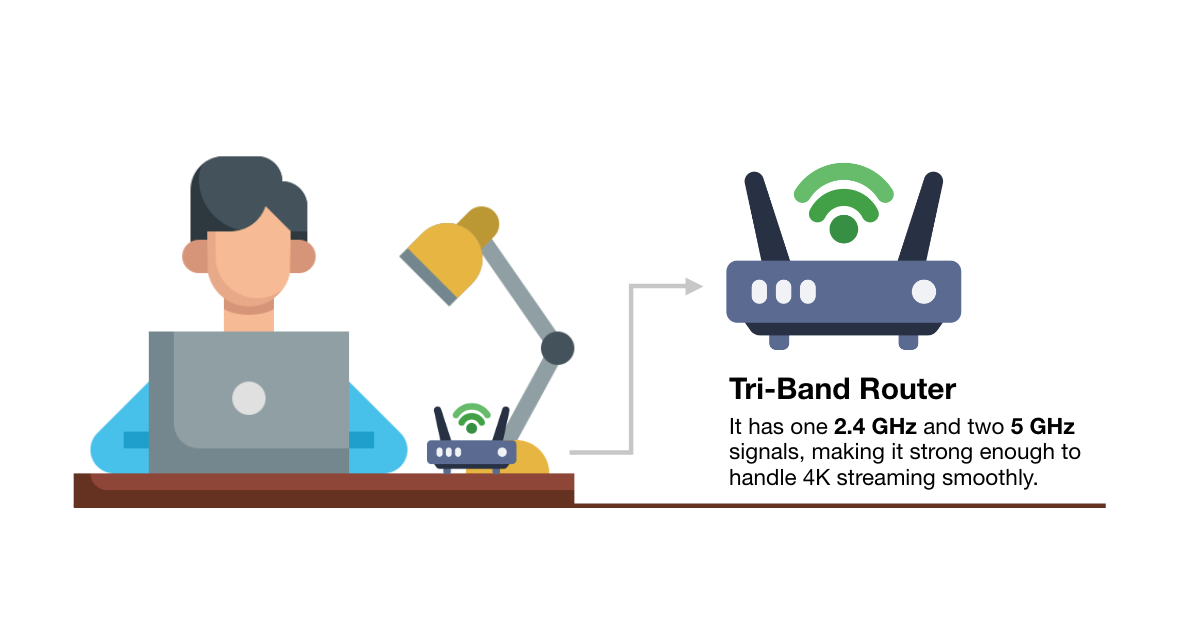
  • Tri Band: Adds an additional 5GHz to reduce congestion on the network.
  • Quad Band: Incorporates the new 6GHz band, along with the other frequencies, for maximum flexibility.

The Convenience of Band Steering

Many modern routers come with a feature called “Band Steering.” This technology automatically decides which frequency (2.4GHz, 5GHz, or 6GHz) is best for each device, based on its usage and location. It’s usually turned on by default to help users get the best possible connection without manually switching between frequencies.

While many appreciate band steering for making their lives easier, some prefer to control which frequency their devices use. They might turn band steering off to ensure they always connect how they like.

Making the Smart Choice

Here’s a simple guide: Choose 5GHz for speed, especially if you’re near your router. Opt for 2.4GHz for a more reliable connection over longer distances or through walls. Consider 6GHz if you have newer devices and need the fastest, least congested connection available.

Picking Your WiFi Path

Choosing between 2.4GHz, 5GHz, and now 6GHz is like picking tools based on the job at hand—each has its strengths. Whether you enjoy the simplicity of band steering or prefer to manage your settings manually, the right setup can greatly enhance your online experience. Make sure your choice aligns with your needs and enjoy the vast world of digital opportunities that good WiFi brings.

Understanding and Avoiding the Web Envy Scam

A Simple Guide to Spotting Email Fraud

In 2021, a new scam emerged targeting small businesses, known as the Web Envy scam. It’s making a comeback in early 2024. Small businesses receive fake invoices from “Web Envy Solutions” for $98.57, claiming charges for SEO/Link Building services. These invoices look real, showing the customer’s name, account number, and domain, and they’re sent via PDF email or sometimes fax, which is unusual for scams.

The Web Envy website appears trustworthy, yet the contact number leads to a dead end, stating it’s out of service. Scammers often send this fake invoice to various people within the same company, hoping someone will respond.

Key Tactics Used by Scammers:

  • Creating Urgency: Scammers know people tend to quickly pay invoices to avoid trouble. They press you to act fast, hoping you won’t check the invoice’s legitimacy.
  • Pretending to Be Trusted: They might impersonate reputable organizations to lower your guard. The Web Envy scam uses a convincing website to trick you.
  • Demanding Specific Payment Methods: Scammers prefer payment methods that are hard to trace or reverse, like wire transfers, cryptocurrency, payment apps, or gift cards.

How to Avoid a Scam:

  • Pause Before You Act: Always examine an invoice carefully. Look for odd details like unfamiliar return addresses or phone numbers. It’s wise to discuss it with your team or technology department to confirm its legitimacy.
  • Guard Your Information: Never share personal or financial details unless you’re sure who you’re dealing with. If an unexpected request comes, verify the requester’s identity before responding. Be skeptical of phone numbers provided in emails—they might lead you straight to the scammer.
  • Reject Unusual Payment Requests: Legitimate bills usually offer standard payment methods, such as checks, credit cards, or online payments. Be suspicious if asked to pay via wire transfer, cryptocurrency, payment apps, or gift cards.

For more tips on avoiding scams, the Federal Trade Commission offers valuable resources. And if you’re curious about enhancing your cybersecurity, feel free to contact us for more information on protective services.

WiFi vs Wired: Pros, Cons, and Which is Right for You

Wifi vs Wired Internet: In the ever-connected world we live in, choosing the right internet connection is vital. Whether you’re streaming your favorite shows, working from home, or gaming online, your choice between WiFi and wired can make a significant difference. In this article, we’ll break down the pros and cons of each option to help you decide which one suits your needs best.

WiFi: The Pros and Cons

Pros of a WiFi connection:

1. Convenience: WiFi offers the ultimate convenience, allowing you to access the internet from anywhere within the range of your router. No more being tethered to a specific spot; you can move freely around your home or office while staying connected.

2. Mobility: Have a laptop, smartphone, or tablet? WiFi enables all your wireless devices to connect to the internet, offering seamless mobility. You can work in your cozy living room, binge-watch in bed, or even take your online meetings to the garden.

3. Cost-effective: Setting up a WiFi network is budget-friendly since it doesn’t require the purchase and installation of physical cables. You can save on installation costs and avoid the hassle of running cables through your walls.

Cons of a WiFi connection:

1. Limited range: While WiFi offers mobility, it does come with limitations. Signal strength can be affected by walls, distance, and other obstacles. If your router is too far away, you might experience slow or unreliable connections.

2. Interference: WiFi signals can be disrupted by other electronic devices and appliances in your home. Microwaves, cordless phones, and even neighboring WiFi networks can interfere with your connection quality.

3. Security: Wireless networks are more susceptible to hacking and security breaches compared to wired networks. If not properly secured, your WiFi network can be vulnerable to unauthorized access.

4. Speed: Although WiFi technology has improved significantly, a wired connection still tends to provide faster and more consistent speeds. When multiple devices are connected to the WiFi network, you may experience reduced speed.

Wired: The Pros and Cons

Pros of a wired connection:

1. Speed: Wired connections are known for their blazing-fast internet speeds. If you require lightning-quick downloads, smooth gaming, or high-definition streaming, a wired connection is the way to go.

2. Stability: Wired connections are less susceptible to interference and signal strength issues, providing a stable and reliable internet connection.

3. Security: Wired networks are generally considered more secure than wireless ones. With physical access required, unauthorized users are kept at bay.

Cons of a wired connection:

1. Limited mobility: The most apparent drawback of a wired connection is its lack of mobility. Devices need to be physically connected to the router via Ethernet cables, which can limit your flexibility.

2. Cost: Setting up a wired network can be more expensive due to the purchase and installation of physical cables. It might not be the most cost-effective option, especially if you need to hire professionals for installation.

3. Inconvenience: Dealing with Ethernet cables can be inconvenient, and they might not be practical in all living spaces. Cables can be unsightly and require careful planning to avoid clutter.

WiFi vs Wired: Making the Right Choice

The choice between WiFi and wired internet ultimately comes down to your specific needs and preferences. Here are some considerations to help you make the right decision:

Choose WiFi if:

  • You prioritize convenience and mobility.
  • You have multiple wireless devices that need to connect.
  • Running cables through your space isn’t practical or aesthetically pleasing.
  • You can optimize your WiFi network with the latest technology like WiFi 6 and secure it properly.

Choose wired if:

  • Speed and stability are your top priorities.
  • You work from a fixed location, like a home office.
  • You want a more secure and interference-free connection.
  • You’re willing to invest in the initial setup and don’t mind the presence of cables.

In the end, both WiFi and wired connections have their unique advantages and disadvantages. By understanding your specific needs, you can make an informed choice that ensures your internet connection aligns with your lifestyle and preferences.

WiFi vs Wired: Common Questions and Scenarios

1. Is WiFi slower than a wired connection?

  • WiFi speeds can be slower than wired connections, especially when multiple devices are connected to the network. However, with advancements like WiFi 6, WiFi speeds have significantly improved.

2. Can I use both WiFi and wired connections at the same time?

  • Yes, you can use both simultaneously on different devices. This can be useful for households or offices with a mix of wired and wireless devices.

3. How can I improve my WiFi signal strength?

  • To improve WiFi signal strength, consider placing your router in a central location, using WiFi range extenders, or upgrading to a more powerful router.

4. Are wired connections more secure than WiFi?

  • Generally, wired connections are considered more secure because they are less susceptible to hacking and interference

Webroot vs Bitdefender: The Antivirus Battlefield

When choosing an antivirus solution, the debate often narrows down to two notable contenders: Webroot and Bitdefender. In the tech corridors of Redbird Technology Solutions, our IT Director Santos recently narrated an alarming incident. A client’s simple click on a deceptive email caused a catastrophic network breach. This incident highlights the undeniable importance of robust antivirus software for both businesses and individual users.

The Imperative for Antivirus Solutions

In today’s digital era, the menace of cyberattacks looms large. Cybersecurity Ventures predicts annual cybercrime costs will reach a staggering $6 trillion by 2021. This projection underscores the indispensable role of antivirus software in protecting valuable data and maintaining seamless business operations.

Webroot vs Bitdefender: A Comparative Analysis

Both Webroot and Bitdefender are lauded for their distinct strengths and capabilities, catering to diverse user preferences and requirements.

Webroot: Where Simplicity Meets Sophistication

Webroot is a favorite at Redbird Technology Solutions. It is celebrated for its intuitive interface and light system footprint, which promise optimal performance without bogging down your system. It thrives on cloud-based intelligence, offering up-to-the-minute protection against the latest cyber threats.

Pros:

– Intuitive user interface

– Minimal system impact

– Cutting-edge cloud-based threat intelligence

Cons:

– Somewhat limited features in comparison to comprehensive security suites

– Potential vulnerabilities to zero-day threats

Bitdefender: A Titan of Comprehensive Security

Bitdefender stands as a fortress of advanced antivirus solutions, boasting an array of features from intricate threat defense mechanisms to robust multi-layer ransomware safeguards. It’s the go-to choice for those prioritizing an exhaustive security arsenal over sheer simplicity.

Pros:

– Broad spectrum of security features

– Robust multi-layer ransomware protection

– Sophisticated threat defense capabilities

Cons:

– Slightly complex interface, possibly daunting for novice users

– Higher system resource consumption relative to lighter counterparts like Webroot

Tailoring the Perfect Antivirus Fit

Santos vouches for Webroot’s ease of use. However, the ultimate decision between Webroot and Bitdefender depends on your business’s specific needs. Choose Webroot if simplicity and performance are your priorities. Alternatively, opt for Bitdefender if your enterprise requires an all-encompassing security solution.

Leveraging Redbird Technology Solutions Expertise

Redbird Technology Solutions recognizes the diverse challenges SMBs face in antivirus management. We offer bespoke services to ensure your antivirus setup is both seamless and potent. Our expertise spans both Webroot and Bitdefender, fortifying your business against the dynamic spectrum of cyber threats.

Conclusion

Selecting the right antivirus is pivotal to your company’s cyber defense strategy. Whether you prefer the user-friendly allure of Webroot or the all-encompassing safety net of Bitdefender, making an informed choice is critical. With Redbird Technology Solutions, you gain a trusted ally. We help you orchestrate and maintain your antivirus infrastructure, safeguarding your digital realm against evolving cyber threats.

Connect with us to uncover the ideal antivirus solution tailored to your business needs, and embrace the peace of mind that comes with expert-backed cybersecurity.

The Importance of a Strong Network and WiFi

The importance of a strong network and WiFi became clear at Blessed Hope United Methodist Church in West Allis, Wisconsin. They struggled with weak internet and had no security cameras to protect their property. Redbird Technology Solutions stepped in to help. In this article, we’ll explore why having a reliable network, strong WiFi, and solid security matters. Especially for churches and small businesses.

Strengthening the Network: A Ubiquiti Solution

Redbird Technology Solutions decided to implement a tried-and-true solution – the Ubiquiti product line, specifically the Unifi series. This endeavor began with the installation of a Unifi Dream Router, known for its exceptional performance and reliability. This router acted as the cornerstone for the subsequent network improvements, allowing the integration of five access points throughout the church premises.

The main sanctuary presented a particularly challenging scenario with its concrete and wood construction. However, the Unifi Dream Router, in combination with strategically placed access points, enabled seamless network coverage even in these demanding conditions.

Wi-Fi as a Lifeline

For the Blessed Hope United Methodist Church, the importance of a strong network and WiFi was clear. They relied heavily on network-powered activities like video streaming and mixing, necessitating a robust connection. Redbird Technology Solutions addressed this need by deploying Unifi access points, ensuring that every corner of the church enjoyed strong and stable Wi-Fi connectivity.

Crucial areas such as the lounge, youth room, and kids’ area, which are often bustling with activity, were now equipped with reliable Wi-Fi. No longer did attendees have to suffer from dropped bars or inaccessible content. The church could now seamlessly share information, stream services, and engage with their community through their strengthened network.

Enhancing Security with Cameras

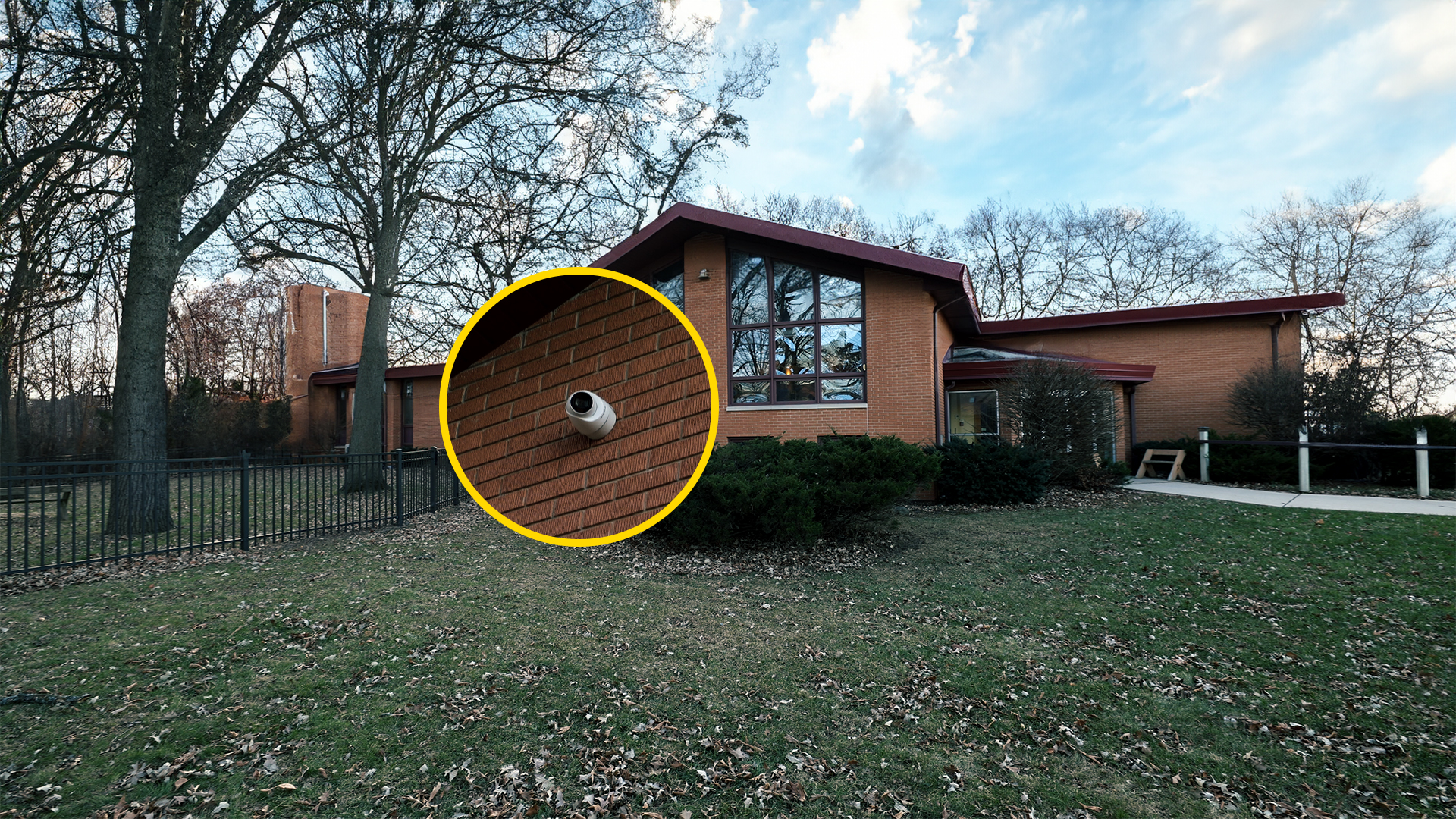
Redbird Technology Solutions also addressed the church’s need for surveillance. They installed a 1080p camera system supported by a Lorex NVR. The setup included different camera models chosen to match the layout and use of each space. While 1080p isn’t the newest option on the market, it still works well for churches and small businesses looking for clear, dependable coverage.

With cameras placed in key areas, Blessed Hope United Methodist Church gained the ability to monitor their property. This helped them protect their staff, members, and building more effectively.

Conclusion

The story of Blessed Hope United Methodist Church shows why a strong network, steady Wi-Fi, and working security cameras matter. These tools help people stay connected, share information, and feel safe.

Redbird Technology Solutions fixed the church’s network and security problems. Their work shows how the right tools can solve real issues. Churches, small businesses, and local groups all need solid tech to support their daily work and keep people protected.

To learn more about the tools used in this project, contact Redbird Technology Solutions. Call 262-475-2615 (options one or two). We can help you build a better network, improve your Wi-Fi, and set up cameras that work when you need them most.